Friday, October 30, 2009

Digital Story.....NASA


What a great digital story! I thought it was well done. I have not really thought of the space programs in awhile and their contributions to our society. The video gently reminded me that it’s a “risky business” since there has been lost of life. I vividly remember being in school and my P.E. teacher asking all of us, to come in to watch the Challenger Mission take off. Since Christina McAuliffe, who was the first school teacher to be allowed to go to space, and that was really exciting. So as I sat there watching the T.V. monitor and after a few minutes of take off seeing the space shuttle never appearing again. I was not sure what was happening at first, then after a little while the announcer was trying to explain what was going on. I also remember thinking what I had just seen wasn’t real and everything was okay. As we know on January 28, 1986 the entire crew died, it was a very sad day for the nation. I really can see how a digital story can be used for a hook in a lesson. Even though students might not know much about the space missions or the technology it’s a great way to encourage curiosity. I think that after watching this video student will want to learn more about the space mission history and future.

Tuesday, October 27, 2009

Intoduced to Digital Stories...


What? What a great day to come to class today! Dr. Waters talked about creating digital stories. I was pleasantly surprised what they were. I thought they were stories that you could read along or be read to. I didn’t realize it was a story you can tell with or without words. I really thought many of the examples she showed in class were pretty powerful. It’s going to be an interest project to complete.

So What? Know I get to create a “small” movie per say. My field partner and I are going to work together to complete this project. We are going to create a digital story that we can use with our fourth grades we are going to be working with this fall. We are going to try to complete this project in three weeks or less. We would like to use this digital story to introduce the Mountain Men and Trappers that that influenced Utah.

Now What? I think once I go through the process of creating a digital story I will know if it’s worth it. From the examples that Dr. Waters showed in class I was pretty moved by certain ones. They can be used to introduce a topic and it can really catch the student’s attention. I look forward to completing my assignment with my group.

Saturday, October 24, 2009

Video: Education for All


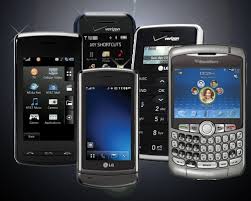
This video was very brief its main idea was to provide education for all children around the world. The video suggested you could send your lecture through cell phone video. Assuming someone in your area has access to a cell phone, which could be difficult in remote areas. Also I would be concern about the phone service and cost. I know that I lose coverage just driving through the Canyon. Cell phones are usually pretty small and it would be hard to see what the teacher is doing. I’m not sure how effective the cell phones would be for children in order to maintain their attention and interest. Not to mention the lack of personal contact that a student needs from a teacher in order to be successful. I do like the idea that we need to think of ways that we can help educated all children around the world.

Learning about PodCast & Vidcast

What? The day began with filling out our rubric for our Website project. I thought my project went well so I gave myself a good score. I really enjoyed the project and I hope to have my own website some day. The initial set-up will be a lot of work but it will be worth it. Parents and students will be able to stay informed and have additional access to other resources. We also discussed Pod Cast and Vidcast which are other tools you can use in the classroom with your students.


So What? Well we have the opportunity to work in groups again. Last semester in my computer class we briefly learned about Pod Cast. In this class we learned how to create our own Pod Cast. As a future teacher I could record certain lectures or special projects. Place them on my website for students to access if they need too. That would be great for students that missed class or simply just want to review your lecture or an assignment. Finally our group completed the Pod Cast that was really fun!


Now What? Our group still needs to complete the Vidcast which we are going to do on Monday. We have decided to show how to create a Mexican flower. I think it’s going to be a little trick to get it done in one minute, but I have a plan hopefully it will work. I’m not feeling good about having my student create a You-tube video especially in the lower grades. I’m concerned about the legalities and safety implications of my student’s identity. I like the ability to show videos in the classroom especially if I’m introducing or expanding on a topic. I will definitely consult with my colleagues before I adventure off doing You-tube videos with my students. I do look forward in creating our group video and having fun with it.


Friday, October 16, 2009

WebQuest Completion....


What? My group WebQuest is completed! Yeah for our team! When our assignment was given I was excited yet overwhelmed. My team was great everyone pitched in and we all worked together to accomplish our assignment. Our WebQuest allows our students to design their own restaurant menu. As a result students learn how to make healthy food choices.

So What? Well this WebQuest will allow third grade students to think outside the box. The way we design it was to allow students to navigate easily through the website and have fun with food. We included a website game called “My Pyramid Blast Off”. The students are trying to get their space ship to blast off but it needs all the proper “fuel”. As they fill the ship with “fuel”. The game tells them if the “fuel” they are providing has enough grains, dairy, meats, vegetables or fruits or to many sweets before taking off. I thought the website was fun I think third graders will like it too.

Now What? This project has allowed me to learn how to create a WebQuest. I’m not sure how practical it’s going to be for me to set-up as new teacher. I liked that it forced me to learn how to better use Microsoft Power Point. I think I will definitely use Power Point as a new teacher. The WebQuest is a great idea. I’m not sure that a WebQuest is going to be my first priority. Instead I’m going to be more interested in having my website set-up. So parents and students can access information as need. Also so my students can have different links, and resources to help them explore and discover. This activity has definitely helped me feel more confident about the tools available to make my teaching for effective.

School House Rock Video...


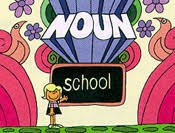
The School House video was a fun way to learn about nouns. I had my eight year old watch it with me. He liked it. After it was finished he said: “A noun is a place, person or thing mom.” The video worked well for him. He seemed intrigued and interested in learning about nouns. I think this video or similar ones would be a great way to introduce a topic to elementary school kids. This is another great way to use the internet in your classroom. Obviously I would review any media before showing it to the students to make sure it was appropriate. It’s been kind of interesting every week to review 2-3 minute videos. I’ve been surprised of how much information they share in such a short period. I will definitely use short videos in my classroom.

Monday, October 5, 2009

Video Blog Surface Computing....


What a great video I got to watch this week. I’m just amazed of the creativity and the brain power that’s out there. This video was about surface computing. This is a new type of computer in the form of a coffee table. Popular mechanics went to Microsoft to discuss a top secret project code named “Milan”. It works well when you use pictures, maps and menus. It allows you to directly touch the images and make them larger or smaller. Basically it allows you to manipulate and interact with few images and graphics at a time.

My favorite part was that this new technology allows you transfer content from one device to another. The example they used was a picture taken from a wireless camera and they transferred the picture to a cell phone with a touch of finger. Both items were on the surface computer when the transferring occurred. There was no downloading or wires to connect. I thought that was awesome. This new technology will find its way to our homes eventually. It’s mainly aimed for large companies like T-mobile, Casinos and the Starwood Hotels the machine will cost from five thousand to ten thousand dollars. I thought this was great, I can see it being used in the classroom one day it would sure make geography more enjoyable.

Webquest Journey...


What? Today was a great day in my Technology Class. I’m excited to learn about how to design my own Web-Quest. I think this will be a great tool for my future students to use. We get to use the Google presentation program and then the finish product will be in a Power Point Presentation. The Web-Quest will have a teacher view and a student view. This project will allow students to learn about the importance of good eating habits. The students will also interact and enjoy different web-sites and they will create their own menu as if they are restaurant owners. So it should be fun!

So What? Well now I need to get the project done. The great part of this project is that it’s a group project so many ideas can be exchange so our final product will be great. Our group has met and we have a game plan so now we just need to execute it. We will be designing for a third grade audience so it needs to challenge the student but not overwhelm them.

Now What? My assignment at this time is to work on the conclusion. Then we will get together and tackle the process and style of our Web-Quest. I originally thought this project was going to be done individually which I was up for the challenge, but now it’s going to be a little easier. So far we have done several projects as a group and I think that’s really preparing me for the future. So when I go out to the workforce I will be prepared to work with others. Sometimes it might go smoothly and other times you might want to quit and do it yourself. So I think this type of assignment is not just completing a “Web-Quest” but it also is helping me with my own personal skills.